Voucher login & data collect
The Voucher login & data collect method is a convenient way to collect customer data and allow login using the Login Code.
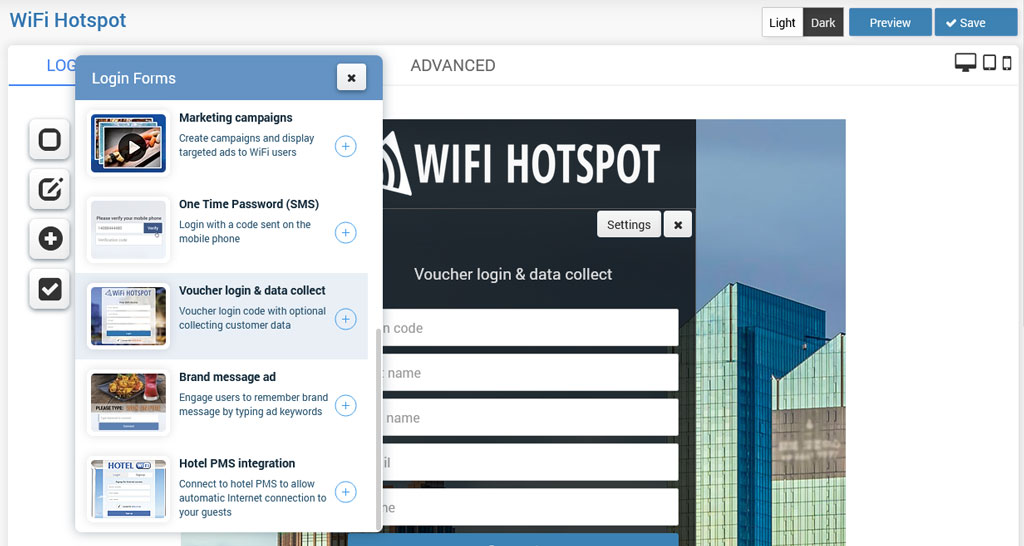
From Login forms choose Voucher login & data collect.When you click on the + button, this login form will be added as the login method.
By default, it is set to collect First Name, Last Name, and Email.
Voucher login & data collect can be configured from the Settings page configuration menu.
It requires only to select customer data that you want to store on the first login.
In addition, is possible to enable Email verification based on the verification API.
Press on Save button to apply changes.
This way will get a Splash page where will be active Voucher login & data collect login method.
Related Articles
User Login
The user login form is the most common login method for commercial use. It is a basic login method with a Username/password or Login code (Voucher). When you click on the + button, this login form will be added as the login method. By default, it is ...Free Access
Free Access over Splash page can be set in a couple of clicks. Available free access forms are: – Free access with a click-through – Free access with a keyword – Free access with collecting customer data When you click on the + button, this login ...Login or Sign Up
Full business automation can be achieved if you allow the signup method for account creation from the Splash page. New users will be able to Signup for free access or pay with a credit card for high-tiered plans. To allow users to signup for free, ...One Time Password
One-time password-based access provides a convenient method for collecting users' valid phone numbers, which can later be utilised for marketing purposes. Users will receive free access to WiFi based on the code sent to their phone number. When you ...Marketing campaigns
Marketing campaigns allow you to easily make additional revenue with the platform. Using the Marketing campaigns login method, you can display targeted ads to the WiFi users on the Splash page. Go to the Marketing Campaigns panel and create at least ...